How Print Analytics Reveals Workflow Bottlenecks and Cost Drivers
By Omar Haddad • 17th Dec

For years, printers operated as silent cost centers, until a SOC 2 audit nearly capsized a healthcare client's compliance renewal. We turned the tide by weaponizing print data analytics to expose credential spray attempts and wasted paper trails. Six months later, business intelligence from printing transformed their fleet from audit liabilities to evidence-generating assets. Logs closed the gap where policy checklists fell short. This is how yours can too.
Why Print Analytics Isn't Just About Cost Savings
Most leaders fixate on toner and paper costs, but that's surface-level. Real value emerges when you map document usage patterns to process risks. Consider these scenarios:
- A financial firm discovered 42% of color prints were accidental (users bypassing department defaults), inflating costs by $18K/year
- A hospital's audit trail gaps delayed HIPAA compliance, until print job metadata revealed unauthorized document access
- Logistics teams traced shipping label jams to specific legacy drivers, not hardware failures
"Logs or it didn't happen." This isn't just my mantra (it is the audit committee's new doctrine). Without immutable logs, security controls are theater.
Assumption callout: Many assume print costs are predictable. Reality? Unmonitored devices bleed resources through:
- Ghost printing (jobs submitted but never retrieved)
- Unsecured Wi-Fi scanning bypassing MFA
- Legacy protocol usage (like SMBv1) enabling lateral movement
These are evidence gaps, not mere inefficiencies. Close them with control mappings that link analytics to NIST 800-171 or ISO 27001 requirements. For a deeper checklist of safeguards, see our printer security features guide for locking down data and audit trails.

How to Pinpoint Your Biggest Workflow Leaks
Q: What metrics actually move the needle on compliance and cost?
Forget "pages printed." Track these workflow optimization metrics:
| Metric | Why It Matters | Action Trigger |
|---|---|---|
| Print-to-release ratio | Flags ghost jobs and security gaps | <85% completion rate = Investigate unclaimed jobs |
| Protocol version usage | Exposes SMBv1/LDAP vulnerabilities | >5% legacy protocols = Immediate disablement |
| Color page cost per department | Reveals policy non-compliance | Unexpected spikes = Audit user permissions |
| Scan-to-cloud destinations | Shows data exfiltration risks | Unapproved platforms = Enforce DLP rules |
A legal client slashed waste by 31% after discovering HR printed 200+ draft onboarding forms daily. If cloud scanning and compliance are priorities, compare enterprise cloud print security for HIPAA and PCI workflows. Their fix? Enforced PIN release and real-time job validation rules. No more "I didn't print that" excuses.
Q: How do we forecast costs without vendor lock-in?
Print cost forecasting requires vendor-agnostic data, because toner contracts won't save you from firmware backdoors. Start here:
- Baseline true TCO: Audit all costs (downtime, helpdesk tickets, emergency service calls), not just sticker price
- Track consumable decay: Monitor page yield vs. vendor claims (e.g., "3K page" cartridges often deliver 2,200)
- Model failure impacts: Calculate cost of 4-hour downtime for critical devices (e.g., patient records printers)
One warehouse operator used print data visualization to prove their "bargain" printers cost 2.3x more than Xerox VersaLink models when factoring in jam-related labor and label reprints.
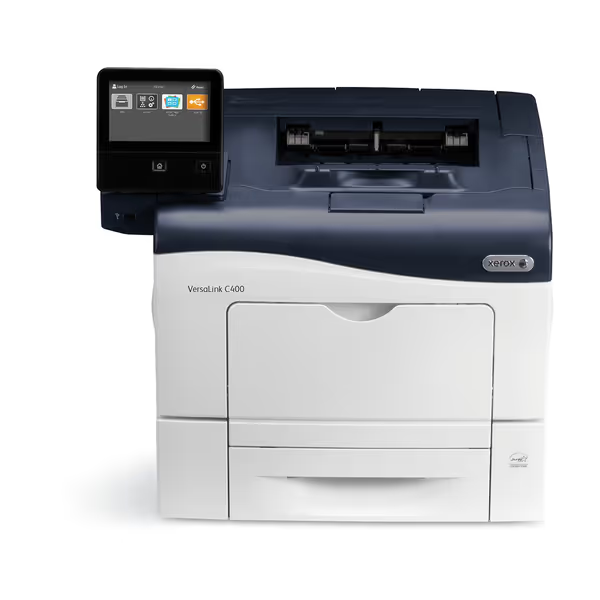
Xerox VersaLink C400/DN Color Printer
App-based, secure color printing for flexible, efficient office workflows.
$729
FeaturesAmazon Dash Replenishment Enabled
FeaturesAmazon Dash Replenishment Enabled
Pros
High print quality and fast duplex speeds.
Strong security features control access.
Cons
Mixed feedback on color accuracy.
Frequent WiFi connectivity issues reported.
Customers praise the printer's print quality, particularly its ability to print on both sides of paper, and appreciate its fast printing speed. The functionality receives mixed feedback - while some report it works flawlessly for over a year, others experience issues.
Customers praise the printer's print quality, particularly its ability to print on both sides of paper, and appreciate its fast printing speed. The functionality receives mixed feedback - while some report it works flawlessly for over a year, others experience issues.
The VersaLink's open API feeds analytics platforms without vendor lock-in (critical for organizations needing SIEM integration). To pick platforms that integrate cleanly, use our printer API comparison to evaluate security and flexibility. Its signed firmware updates also generate attestation evidence auditors demand. Security defaults must be visible, enforceable, and verifiable.
Turning Data Into Action: Your First 30-Day Plan
Don't drown in dashboards. Focus on actionable analytics:
- Map your biggest risk to one metric: If PCI compliance is urgent, track unencrypted scan destinations first
- Run comparison tests: Measure current state vs. 30 days post-automation (e.g., PIN release adoption)
- Demand evidence-ready logs: Ensure syslog streams include user identity, device firmware hash, and job attributes
A mid-sized university cut helpdesk tickets by 68% after correlating driver errors with Chromebook usage patterns. Running a mixed Windows/macOS/ChromeOS environment? Start with our printer OS compatibility guide to eliminate driver mismatch issues. Their fix? Policy-based deployment of universal drivers, no more "Mac incompatible" tickets.
Plain-language threat model: Ignoring print analytics means unknown attack surfaces. An unlogged printer becomes a pivot point for ransomware (CVE-2023-27361 proves it). But with observability?
- You see attempted exploits via protocol logs
- You prove secure defaults were enforced via firmware attestations
- You cut waste via granular department reporting
Final Word: Analytics as Your Compliance Co-Pilot
Print analytics isn't about counting pages, it's about transforming printers from black holes into data sources. When your audit team asks "How do you know controls work?", you'll have evidence: signed firmware logs, protocol usage stats, and cost attribution reports. That's how we turned a near-failed SOC 2 into a clean renewal.
Logs or it didn't happen. Period.
Your next step: Run a 7-day pilot tracking one critical metric (e.g., print-to-release ratio). Compare results against your risk profile using NIST SP 800-179 guidelines. Share findings with compliance teams before your next audit cycle, this is how you turn print from a liability into your quietest compliance win.
Related Articles